All products
4 items
ISTA 4.60.13 is a 2026 standalone BMW diagnostic software package for professional diagnostics, service functions, guided troubleshooting, repair information, vehicle testing and programming-data-related work. This version includes PSdZData Full 4.60.11 and is designed for BMW, MINI and Rolls-Royce vehicles using BMW-based electronic systems. ISTA 4.60.13 BMW Diagnostic Software ISTA+ 4.60.13 provides a complete offline diagnostic environment for workshops, BMW specialists, independent technicians and advanced users who need a reliable BMW service and diagnostic solution. The software allows you to identify the vehicle by VIN, perform a full vehicle test, read and clear fault codes, check control units, access service plans, view live data, run test modules and use workshop repair information in one standalone installation. This package includes PSdZData Full 4.60.11, making it suitable for supported BMW F-Series, G-Series, BMW i models and newer BMW platforms where complete programming data is required. It is also useful for users who need a full BMW diagnostic software download for service, maintenance, coding preparation and advanced BMW software work. Main Functions Full BMW, MINI and Rolls-Royce diagnostics Automatic vehicle identification by VIN Read and clear DTC fault codes Full vehicle scan and control unit overview Control unit tree and control unit list Guided troubleshooting and test plans Live data and measured values ECU information and module status Service reset and maintenance procedures Battery registration support Repair instructions and workshop service information Programming data support with PSdZData Full 4.60.11 Offline standalone diagnostic environment What’s Included ISTA+ 4.60.13 standalone diagnostic software PSdZData Full 4.60.11 database Video installation guide Step-by-step setup instructions Secure digital download Optional paid remote installation service Supported Vehicles BMW E-Series BMW F-Series BMW G-Series BMW i models MINI R-Series MINI F-Series Rolls-Royce vehicles based on BMW electronic systems Compatibility depends on the vehicle year, platform, installed control units, diagnostic interface and selected software functions. Compatible Diagnostic Interfaces ENET cable — commonly used for BMW F-Series and G-Series diagnostics and coding ICOM Next — recommended for professional diagnostics and programming-related work K+DCAN cable — used for many older BMW E-Series diagnostic tasks Diagnostic cables and hardware interfaces are not included. For the most stable professional use, ICOM Next is recommended. ENET is commonly used for F-Series and G-Series diagnostics, while K+DCAN is mainly used for older E-Series vehicles. System Requirements Windows 10 / Windows 11 64-bit Windows recommended Minimum 200 GB free space for diagnostics Up to 500 GB free space recommended for full installation with PSdZData Full SSD strongly recommended Minimum 8 GB RAM, 16 GB recommended Administrator rights required Stable internet connection required for downloading files Antivirus exclusion may be required during installation Languages English German Additional language files may be available upon request depending on package availability. Delivery This is a digital product only. No physical item will be shipped. After purchase, you will receive access to the download files and installation materials. The package includes a video installation guide. Remote installation is available as a paid service via TeamViewer or AnyDesk. Important Notes Works as an offline standalone installation Online functions are not included Installation is possible only on the C drive Programming and coding require experience, stable power supply and compatible hardware Hardware cables and diagnostic interfaces are not included We do not provide support for configuring or repairing customer diagnostic cables Always use a professional battery charger when performing programming-related operations
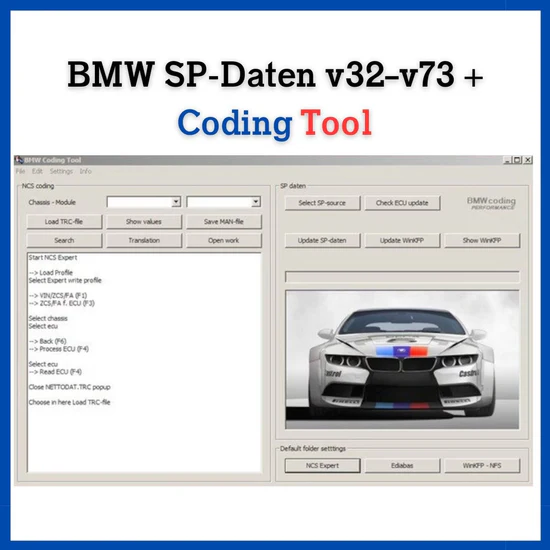
BMW SP-Daten v32–v73 + Codiertool v250 Complete SP-Daten package for coding, programming, and diagnosing BMW E-series control units. This bundle includes the most popular SP-Daten versions from v32 to the latest v73, fully compatible with tools like NCS Expert, WinKFP, and INPA. Included: • SP-Daten versions: v32, v39, v41, v50.2, v55.0, v60.1, v67.1, v68.0, v68.1, v69.0, v70, v71 • Latest release: SP-Daten v73 (RAR archive) • Legacy versions: SP-Daten 2.51.2, 2.53.0.5, 2.54 • E89 V28 model-specific data • BMW Coding Tool v250 for fast import into NCS Expert / WinKFP Main Uses: • Flash BMW ECUs with WinKFP • Code modules using NCS Expert • Diagnose and test with INPA • Update modules and apply custom configurations System Requirements: • Windows 7, 10, or 11 • Works with K+DCAN cable or INPA-compatible interfaces • Compatible with most BMW E-series models (1998–2013) Delivery: • Instant secure digital download link after purchase • Total size: ~225 GB • Hosted on fast, resumable cloud storage This SP-Daten pack is ideal for workshops, retrofitters, coders, and advanced DIYers working on BMW E-series vehicles. Note: Digital product only. No refunds for incompatible systems.
 Sale
Sale
Language: EN – English DE – German Ru – Russian ES – Spanish FR – French Files comes on drive for speedy and smooth download…not Mega or other kind of slow links You will need ENET, K-DCAN or ICOM interface cable to use with your vehicle depend on model you got ———————————————— ————————————————- Some features: •For BMW series SERVICE functions, for system activating, for module programming •Oil •Fuel system •Air Suspension bleeding •New battery register •Brake pads •NAV •Electrical schemes •Repair and maintanance info •Lights and much more. • Full manuals and technical data for all vehicles in offline mode without having to be connected to the car • EGR System control and testing • Read / Clear / Reset Air Bag Light Codes • Read / Clear Reset ABS Light Codes • Diagnostic on Individual Modules • Disable RCD Warnings, Disable Tyre Control Inactive Messages+ Many more features • Creation of Test Plans for Repairs • Key and Memory Personalising features (lights, comfort features etc) • Reset Adaptations • Fault code Reading & Resetting • Wiring Diagrams • Service Reset • DPF Regeneration • Activate ABS Pump for bleeding Supported vehicle models: • 1 Series (E81, E82, E87, E88, F20, F21, F52, F40) • 2 Series (F22, F45, F46) • 3 Series (E46, E90, E91, E92, E93, F30, F31, F34, G20) • 4 Series (F32, F33, F36) • 5 Series (E60, E61, F10, F11, F07, F18, G30, G31, G38) • 6 Series (E63, E64, F06, F12, F13, G32) • 7 Series (E65, F01, F02, F03, F04, G11, G12 X1 (E84, F48) • X2 (F39) • X3 (E83, F25, G01) • X4 (F26, G02) • X5 (E53, E70, F15, G05) • X6 (E71, E72, F16) • X7 (G07) • Mini (R50, R52, R53, R55, R56, R57, R57, R58, R59, R60, R61, F54, F55, F56, F60) IMPORTANT NOTE, PLEASE MAKE SURE TO READ – in order to run the program you must cover the following requirements: – CPU at least 2.2GHz – RAM at least 4GBs – HDD or any type of storage of at least 300 GB – Windows 10 and above (Windows 7 IS NOT supported) -Microsoft visuals++ 2013 -Microsoft .NET Framework 4.8.x -Visual C++ Runtime 2015-2019
 Sale
Sale
ODIS Service 25.0.1 + ODIS Engineering 19.0.0 – Full Diagnostic & ECU Programming Software for VAG Group Vehicles Unlock advanced diagnostics and ECU programming capabilities for Volkswagen, Audi, Skoda, SEAT, Bentley, and Lamborghini vehicles with this powerful ODIS bundle. Suitable for independent workshops, tuning professionals, and experienced enthusiasts working with VAG cars up to model year 2025. This package includes the latest versions: ODIS Service 25.0.1 – for full vehicle diagnostics, module coding, guided fault finding, actuator tests, service reset, and more ODIS Engineering 19.0.0 – for advanced control unit programming, flashing, firmware updates, adaptations, and coding from internal databases A step-by-step video installation guide is included to ensure a smooth setup process. Optional remote installation via TeamViewer is also available upon request. Key Features: Works with genuine VAS6154, VNCI 6154, VXDiag SE 6154, SVCI 6154, Scanmatik 2 Pro, and other J2534-compatible adapters (Note: VAS5054 is not supported) Supports manual vehicle selection (VIN auto-detection is disabled offline due to new VAG security starting from version 23.1.x) Multilingual interface: English, German, Russian No online access or official login included – works fully offline Includes all standard functions: Control unit diagnostics for all systems Fault code reading and clearing Real-time live data display Module coding and long coding Actuator tests and adaptations ECU flashing and firmware updates (Engineering) System Requirements: Windows 10 or 11 (64-bit only) SSD with at least 50 GB of free space (80 GB for ODIS-S, 40 GB for ODIS-E) Intel Core i5 or better with 8 GB RAM recommended USB interface adapter (Bluetooth not supported for coding) Delivery Details: This is a digital-only product. After purchase, you will receive a secure download link containing both software packages, setup instructions, and activation tools. Best For: VAG-certified and independent workshops Diagnostic and ECU coding specialists Retrofitters and firmware programmers Experienced enthusiasts working on VAG platforms VAG Software Hub – Compare ODIS Service vs ODIS Engineering and choose the right setup for your VW/Audi/Skoda/SEAT. Need help choosing? Contact us with your vehicle model/year and interface (VAS6154A/J2534).